← All guides
RunableWorkflowContent

How to Build a 7-Day AI Content Dashboard

Research, approve, write, and organize a full week of content in one interactive workflow.

If you create content regularly, the hardest part is often not filming. It is figuring out what to post, researching the topic, writing the script, finding visuals, and keeping everything organized.

This workflow uses Runable to turn that into one interactive system. Instead of one giant prompt and generic output, Runable works with you step by step: it asks about your niche, researches current topics, lets you approve the ideas, learns your style from past scripts, writes the content, and builds a 7-day dashboard.

Try Runable ↗
40% off the monthly Pro plan
HARLEYDIGITAL40

Who this is for

Content creatorsFounders and entrepreneursSocial media managersMarketersAnyone publishing content consistently

What you will build

7 timely ideasCurrent research and sources for each one.
Hooks and scriptsOn-screen and spoken hooks, and scripts written in your style.
A 7-day planB-roll and visual recommendations plus a publishing plan.

Everything ends up in a functional content planning dashboard. Here is an example of the finished weekly overview:
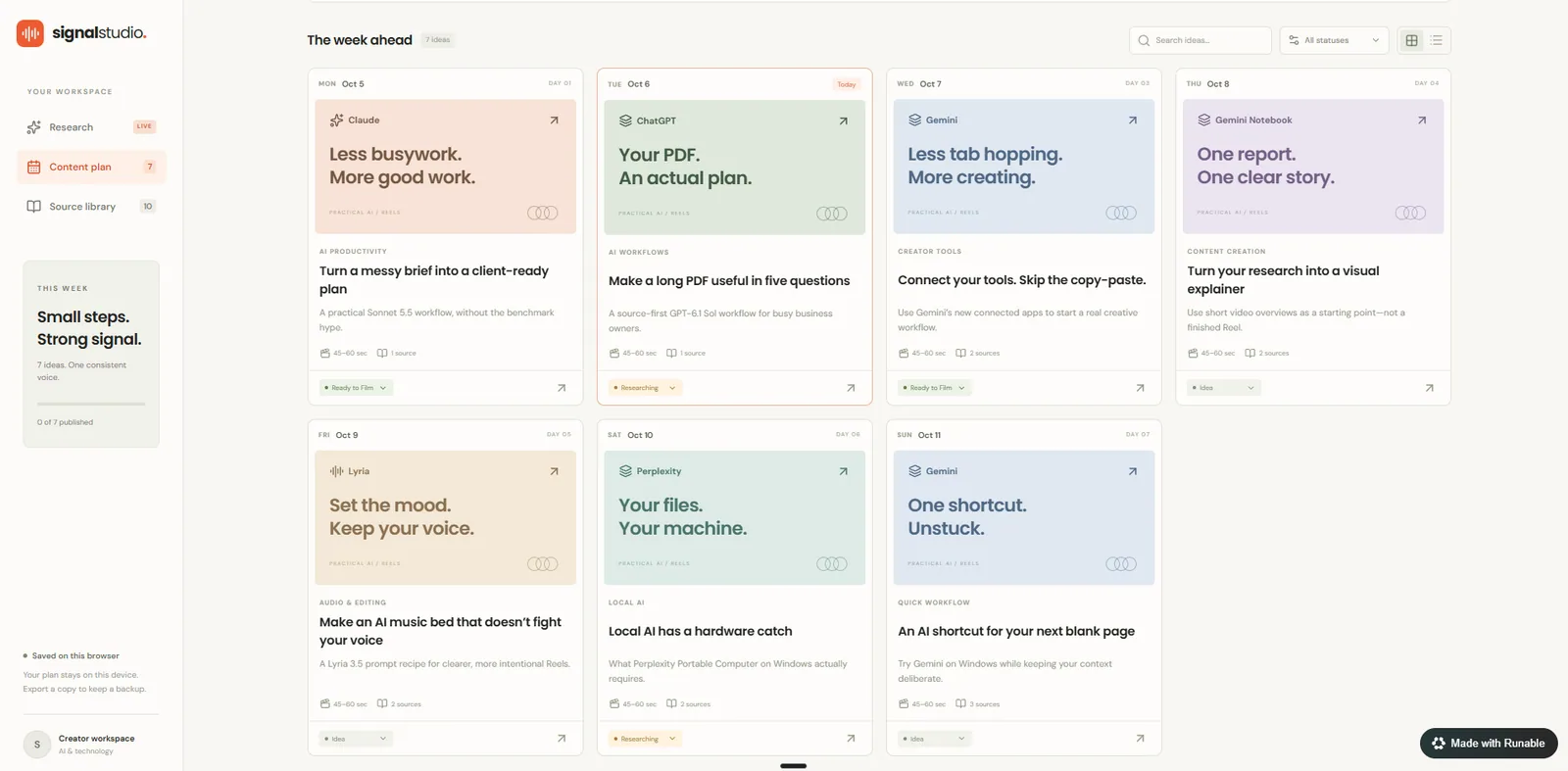
Weekly overview of a 7-day content dashboard with a card for each day, a topic, a research source count, and a status
The weekly overview: seven days, one card each, with a status you can change as you go.
Copy & paste

The Master Prompt

Paste this into Runable to start. It tells Runable to stop at each checkpoint and wait for you. The steps below explain how it works.

Copies the full prompt (about 4,500 characters), even while it’s collapsed.
Show the full prompt
I want to build a 7-day content planning dashboard that actively researches current topics, helps me decide what to post, writes my content, and organizes everything in one place. IMPORTANT: Work with me step by step. Do not complete the entire workflow at once. You must stop at each checkpoint below and wait for my response before continuing. CHECKPOINT 1 — LEARN ABOUT MY CONTENT Before doing any research, ask me the questions you need to customize this properly. At minimum, learn: - My niche or industry - My target audience - The main topics I usually cover - Which platforms I create content for - What type of content I make - How often I publish - My preferred content length - My tone and writing style - My main content goal - Any topics, companies, or content types I want to prioritize or avoid Ask these questions conversationally. Do not overwhelm me with a huge questionnaire all at once. Wait until you have enough information before continuing. CHECKPOINT 2 — ACTIVE RESEARCH Once you understand my content strategy, research what is currently happening in my niche. Look for: - Recent news - Product launches - Updates - Emerging trends - Interesting research - New tools - Useful resources - Topics gaining attention - Practical ideas relevant to my audience Prioritize topics that are: - Timely - Useful - Practical - Visually interesting - Relevant to my audience - Strong enough to turn into content Use reliable sources and include direct links wherever possible. Then recommend the best seven content ideas for the next seven days. For every idea, include: - Topic - Why it matters right now - Key research and facts - Sources - Direct links - Suggested angle - On-screen hook - Spoken hook - Strong second line STOP HERE. Show me the seven ideas and ask: “Do you want to approve these seven topics, replace any of them, change an angle, or research anything deeper?” Do not write the final scripts yet. Wait for my response. CHECKPOINT 3 — UPLOAD MY PREVIOUS SCRIPTS After I approve the seven topics, STOP again. Before writing any scripts, ask me: “Do you have previous scripts or content examples you want me to use as a writing-style reference? If yes, upload them now. If no, tell me and I’ll continue without them.” Do not generate any final scripts until I answer. If I upload previous scripts, analyze: - Hook structure - Sentence length - Pacing - Tone - Vocabulary - Transitions - How I explain complicated ideas - Storytelling structure - CTA style Use my previous scripts as a STYLE reference only. Do not copy them, reuse their topics, or let them influence which topics were selected. After analyzing them, briefly summarize what you learned about my writing style. Then ask: “Should I use this style for the seven new scripts?” STOP HERE. Wait for my response before continuing. If I tell you I do not have previous scripts, continue using the preferences I gave you during the initial setup. CHECKPOINT 4 — WRITE THE CONTENT Only after I approve the writing style should you create the final content. For each of the seven days, include: - On-screen hook - Spoken hook - Strong second line - Full script - Suggested CTA - What I should show on screen - B-roll ideas - Screenshots - Articles - Product pages - Supporting visuals - Useful assets and links Match the length, tone, and format to the content style I told you I create. Avoid generic ideas. CHECKPOINT 5 — BUILD THE DASHBOARD After the research and content are complete, build me a functional content planning dashboard. The dashboard should include: - Day / publishing date - Topic - Why it matters now - On-screen hook - Spoken hook - Full content/script - Research summary - Sources and clickable links - What to show on screen - B-roll and supporting assets - Content status Content statuses should include: Idea → Researching → Ready to Film → Filmed → Editing → Posted Create a clean weekly overview where I can immediately see all seven days. I should also be able to open each content idea and see its complete research, sources, script, and visual recommendations. Make the dashboard simple, modern, and designed for someone who publishes content frequently. The final result should be a usable content planning platform, not just a written report. When I open it, I should immediately know: - What should I post today? - Why is it relevant? - What should I say? - What should I show? - What research backs it up?
The workflow

How It Works

Eight steps, with three points where Runable stops and waits for you.

Step 01

Runable Asks About Your Content

Before it researches anything, Runable asks about:

  • Your niche or industry
  • Your target audience
  • Your main content topics
  • Your platforms
  • Your content format
  • How often you publish
  • Your preferred content length
  • Your tone and style
  • Your content goals
  • Topics you want to prioritize or avoid
Step 02

Active Research

Next it searches your niche for:

Recent newsProduct launchesUpdatesEmerging trendsInteresting researchNew toolsUseful resourcesTopics gaining attention

It wants topics that are timely, useful, and relevant to your audience.
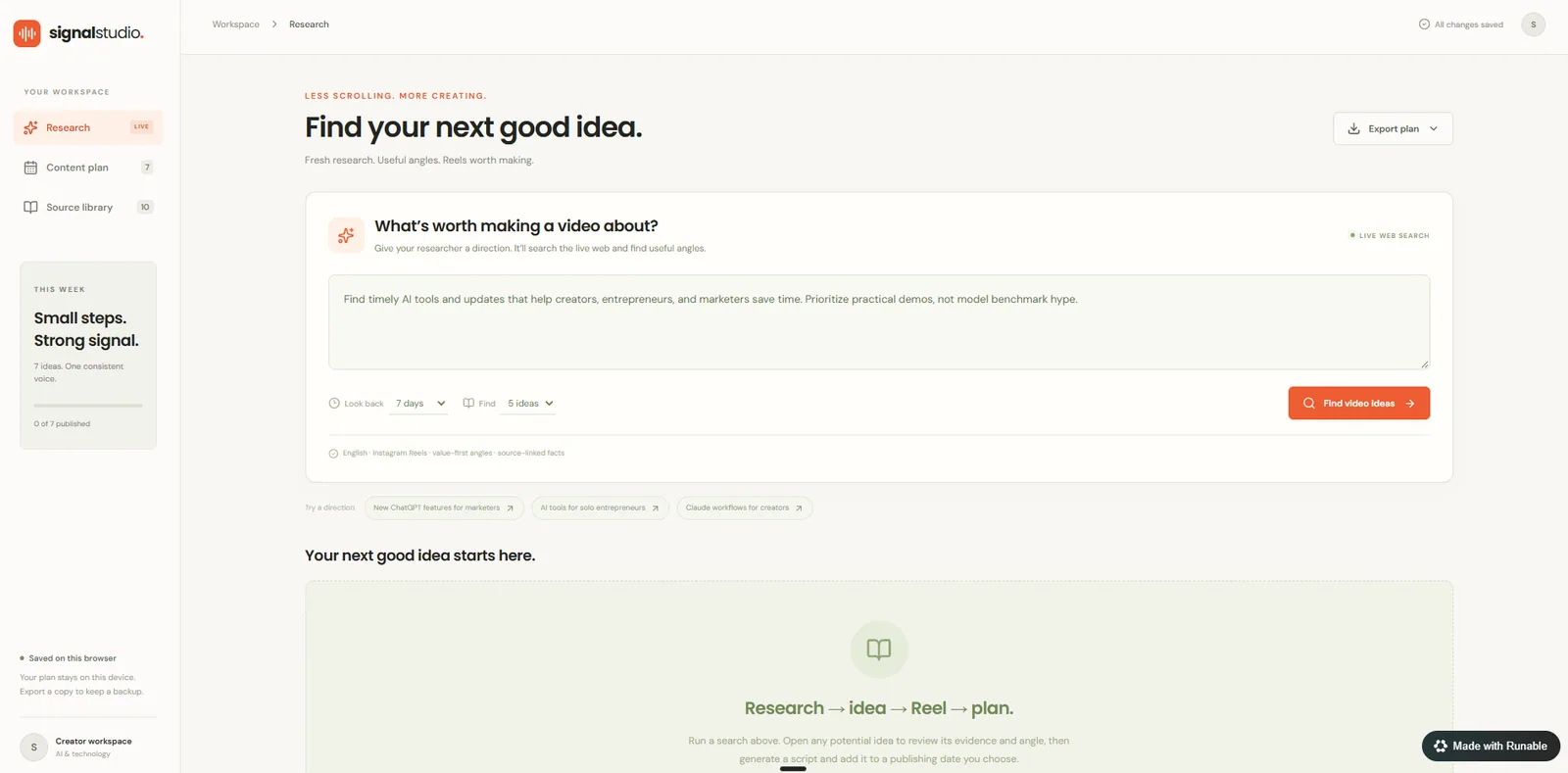
Research screen of the content dashboard with a search box that finds timely video ideas from the live web
The research screen: give it a direction and it searches the live web for timely ideas.
Step 03

Build the 7-Day Plan

It picks the seven strongest ideas for the week. Each one comes with:

TopicWhy it matters nowKey factsResearch summarySourcesDirect linksSuggested angleOn-screen hookSpoken hookStrong second line
Step 04

Approve the Topics

Before any scripts get written, it shows you the seven ideas and asks if you want to:

  • Approve all seven
  • Replace any ideas
  • Change the angle
  • Research something deeper

Checkpoint: Runable stops here and waits for you. No scripts get written yet.

Step 05

Upload Your Previous Scripts

Once you approve the topics, it stops again and asks:

Runable asks“Do you have previous scripts or content examples you want me to use as a writing-style reference? If yes, upload them now. If no, tell me and I’ll continue without them.”

If you upload scripts, it studies:

Hook structureSentence lengthPacingToneVocabularyTransitionsHow you explain complicated ideasStorytelling structureCTA style

Your old scripts are a style reference only. It will not copy them or reuse their topics.

Checkpoint: Runable stops again and waits for your answer.

Step 06

Confirm the Style

It summarizes what it learned about your writing style and asks if you want that style used for the seven new scripts.

Checkpoint: Approve the style before any final content is written.

Step 07

Write the Content

After you approve the style, it writes all seven days. Each day gets:
On-screen hookSpoken hookStrong second lineFull scriptCTAWhat to show on screenB-roll ideasScreenshotsArticlesProduct pagesSupporting visualsUseful assets and links
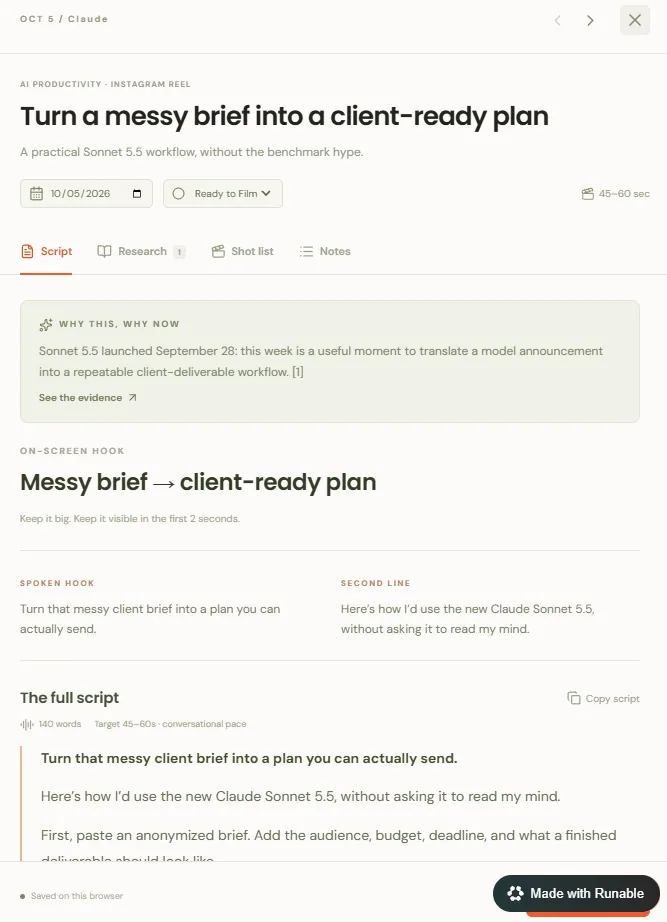
Single idea view showing why this topic matters now, the on-screen hook, spoken hook, second line, and the full script
Open any idea to see why it matters now, the hooks, and the full script.
Step 08

Build the Dashboard

Last, it builds the dashboard. It includes:

  • Day / publishing date
  • Topic
  • Why it matters now
  • On-screen hook
  • Spoken hook
  • Full script
  • Research summary
  • Sources and clickable links
  • What to show on screen
  • B-roll and supporting assets
  • Content status

Content statuses

Idea→Researching→Ready to Film→Filmed→Editing→Posted
Try it

Try Runable

Paste the master prompt, answer its questions, approve the topics and style, and it builds the dashboard.

Try Runable ↗
40% off the monthly Pro plan for my audience
HARLEYDIGITAL40

Disclosure: this guide features Runable as part of a sponsored collaboration. Pricing and promo terms are set by Runable and may change.

← Back to all guides